Link and embed
In a Logic Flow's Share, turn on Share outside: anyone can then use it from its link, or on a page where its code is pasted, without signing in. It always shows the latest version.
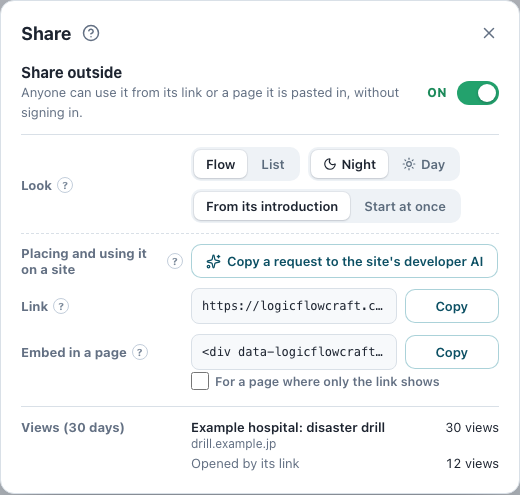
- Look
- Flow (night or day) or List. Start at once skips the introduction.
- Off and on
- Off, the link and every pasted page show nothing; on again, the same link and code work.
- Height
- As tall as the visitor's screen (420 to 860 pixels). To fix it, add data-height="720".
- Only the link shows
- Some pages run no scripts of others. Tick For a page where only the link shows under the code, and copy the frame instead (a fixed height; form settings do not work there).
- Who may share
- Its Owner for a Public or Personal one; for a Group's, that Group's Manager or a Co-manager. Only released ones.
- Views
- While shared, the button reads Sharing; open it to see the sites it was shown on over the last 30 days, and how often. Views inside LogicFlowCraft are not counted.
Placing and using it on a site
- A visitor answers
- The page is toldeach answer, then the result
- The page uses it
Each answer, and at the end the result (the conclusion reached, the values worked out, the sources), reach the page it is pasted in: the site may fill a form with them, record or tally them, or change what it shows.
In Share, copy the request under Placing and using it on a site and paste it into the AI that builds the site (ChatGPT, Codex, Claude Code and the like).
- From embedding to using the answers and checking that it works, it builds it with you.
- When the Logic Flow you made needs changing, the AI connects to LogicFlowCraft itself: you only press Allow on the page that opens.
- To change it later, copy it again and paste it into a new chat.
Answers may include personal information. Once the page that embeds it receives them, how they are handled is the responsibility of whoever embeds it.
For help with the details of embedding, or with building what uses the answers, ask us: Contact
Try it
Paste a shared Logic Flow's link: answer it here and see what the page is told.
Receive them in code (for developers)
The page that embeds it is told each answer and the result. Read them by their IDs: a single choice arrives as its words, so editing them changes what arrives. Each message carries the version. Opened with ?lfc-debug added to its address (&lfc-debug if it has a ? already), the page shows what arrives in the browser's console.
<script>
window.addEventListener("message", (event) => {
if (event.origin !== "https://logicflowcraft.com" || event.data?.type !== "logicflowcraft") return;
if (event.data.event === "result") {
// event.data.result.text: every conclusion reached; .answers: every answer, each with its question's inputId
document.querySelector("textarea[name=message]").value = event.data.result.text;
}
});
</script>Usage counts
When a Logic Flow's owner (for a Group's, its Manager and Co-managers) turns on counting, each run asks first; only runs the person agrees to are sent to LogicFlowCraft and added to counts. It works the same without agreeing.
- Sent to
- LogicFlowCraft (operated by Hisashi Johno)
- What is sent
- The choices picked (which may include answers about health), the path taken, and whether it was finished. Never numbers answered, times or the page's address, though the path taken may show the range of a number answered.
- Who sees it
- Its provider: a Public or Personal one's owner; a Group's Manager and Co-managers. The page that embeds it does not see them.
- Why
- For its provider to learn, as counts, how it is used.
- Not kept
- Who answered (account, IP address and the like) and a record of each run's answers. Only counts are kept.
- Kept for
- This month and the 12 before it. Exported CSV files stay with the provider after that.
- Hosting records
- Apart from the counts, the hosting provider may keep records such as IP addresses and the addresses visited (see the Privacy Policy).
- What the provider sees
- Counts by day over any period kept, and for each answer of up to five questions to filter by (such as age group) with every other question's answers, also exported as CSV. When few have answered, or counts before and after are compared, answers or the path taken may become apparent.
- Rules
- Those who see the counts must not identify who answered from them or from exported CSV files, or match them with lists or other information. Publishing a CSV file or giving it to others is not part of this consent.
- To stop
- Choose Start without agreeing, or Withdraw consent during a run. Once sent, a run cannot be taken back out of the counts.
- Where it is used
- Only Logic Flows where the person using it answers about themselves and can understand what they choose. When answering about someone else, choose Start without agreeing.
- Not covered by this consent
- Answers passed to the page that embeds it, the record of views and where it was shown, and that page's own analytics are separate from this consent.
- To look further
- These counts go no further. To split answers further, or to check them against who answered with their consent, the page that embeds it can receive the answers and do so (Placing and using it on a site); how consent is asked for and the answers are handled there is the responsibility of whoever embeds it.
- The consent wording
- Version 4, shown from October 31, 2026